Data 360 and Marketing Cloud: Activating Segments Without Copying Data
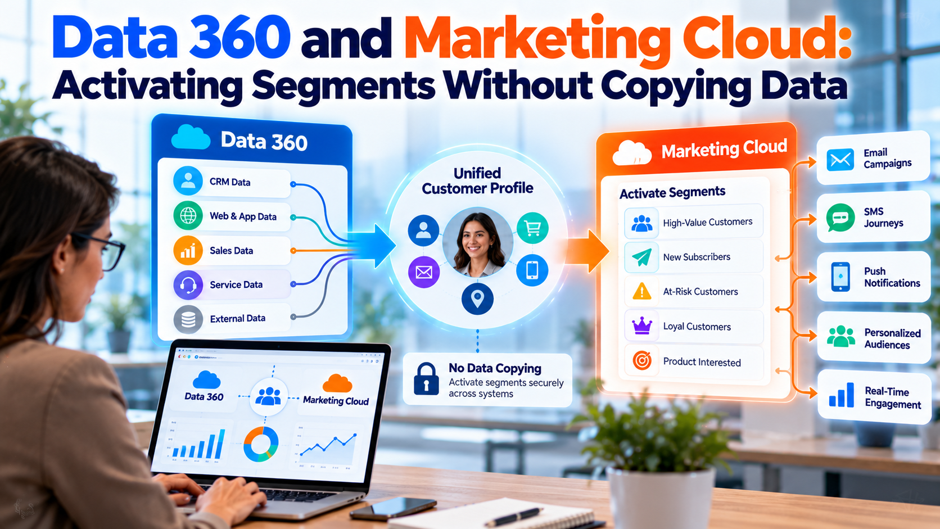
Picture the CRM manager at a regional retailer whose analysts keep 6 years of purchase history in a cloud warehouse. Marketing wants a “lapsed high spenders” audience in Marketing Cloud by Friday, and the data team says it can’t copy 90 million order rows into another system without a security review. The manager has heard that Data 360 can activate segments without copying data, and she wants to know exactly what that covers before she promises anything to security. This scenario is invented for illustration and doesn’t describe a real company or person.
This post separates what stays in place from what moves when a Data 360 segment feeds Marketing Cloud. It draws on Salesforce’s no-copy federation page, a Salesforce training unit on segment publishing, Salesforce’s Aug 31, 2026 Flex Credits rate card, the Marketing Cloud Next pricing page and 3 independent blogs, which I flag as personal or unverified. All Salesforce material is vendor material. I couldn’t read the Salesforce Help articles on activation targets, and I found no statement of how long segment membership is retained. Confirm every claim with Salesforce before you design around it.
TL;DR
- Source data can stay put, but segment members still move. Salesforce says federation lets Data 360 query external data without copying it, yet activation writes a membership list and sends it to each target. A sendable data extension in Marketing Cloud Engagement, or a file in cloud storage, is a copy of the members and the attributes you choose.
- Cadence drives cost more than activation does. In my invented model with 2 million profiles and 25 segments, daily publishing costs $375 a month in credits at the published base rate, hourly publishing of 10 rapid segments costs $3,600, and activation adds under $35. Every input is assumed.
- Published rates disagree. Salesforce’s rate card lists segmentation at 50 credits per million rows, while a March 2026 third-party guide cites 20. Trust the rate card, and ask Salesforce to define “rows processed” in writing with a worked example from your own segments.
What each layer holds and whether a copy exists
The phrase “without copying data” hides several layers, and each has a different answer. The table follows data from the source to the send, using Salesforce’s no-copy federation page, its segment publishing training unit and an independent walkthrough of activation. The last column is my reading of those sources rather than a Salesforce statement, and I’ve marked the places where the sources go quiet, so you can send those questions to Salesforce before you design anything around the claim.
| Layer | What lives there | Is a copy made? (my reading) |
| Source warehouse or lake | Raw tables in Snowflake, Databricks, Redshift or BigQuery | No; the data stays in place |
| Federated access in Data 360 | Query results, processed in memory and discarded, per Salesforce | Not stored, per Salesforce; optional caching can hold data temporarily |
| Data model objects | Mapped definitions of the source data | Depends on whether the stream is ingested or federated |
| Segment | Criteria evaluated against unified profile data | The definition, not the data |
| Segment membership | Written to a membership object, then sent to targets | Yes; retention not stated in what I read |
| Engagement data extension | A sendable data extension with the attributes you choose | Yes; members and chosen attributes are copied into it |
| File target | CSV, JSON or Parquet in cloud storage or SFTP | Yes; a file is created in the destination |
The pattern is that the large source tables can stay in place while a much smaller membership list moves. That’s a real difference from loading all the data into another platform, and it still means some data leaves Data 360 every time you activate. Describe the design to security in those terms: source data is federated, and only the members and attributes you choose are written to targets. Say so plainly.
What “without copying” can honestly mean
- Source data stays in the warehouse. Salesforce’s page defines the technology as data federation that lets enterprises access and query data without copying it. For the query federation, it says Data 360 queries the external source through JDBC drivers and the data is processed in memory and discarded after use. It names Snowflake, Databricks, Redshift and BigQuery as supported out of the box. This is the strongest honest reading of the phrase, and it concerns the source tables rather than the activated audience.
- Segments are definitions rather than copies. A segment is a set of criteria, and Salesforce’s training material says the criteria draw on unified profile data. Building or editing a segment doesn’t duplicate the source tables. What the segment produces is membership: a list of who qualifies. That’s a much smaller object than the data behind it, which is why the claim feels true, but it’s still stored and sent, so it needs the same governance as any customer list.
- The members still move. Salesforce’s training unit says membership writes to a segment membership object and goes to the configured targets. An independent walkthrough says the Marketing Cloud Engagement target creates a sendable data extension, and file targets write files. At the target, a copy exists. The phrase “no data leaves Data 360” doesn’t hold for activation, so avoid it in security reviews, contracts and marketing copy. Plan the target as governed storage.
- Caches are optional but real. Salesforce’s page lists physical ingest, live query and cached acceleration as ingest options, and says caching temporarily stores data and refreshes it incrementally. It calls caching an optional tuning step rather than a requirement. If your security review requires that nothing is stored, confirm in writing that each stream uses federation without caching, and keep the configuration screen as evidence. Ask Salesforce which setting your streams use today.
How segment activation reaches the sending platform
Membership. When a segment is published, Salesforce’s training unit says membership writes to a segment membership object and goes to each configured target. Publishing can run on a schedule or on demand, and a segment with a preset schedule must also send an activation to a target. A segment that’s never activated therefore builds membership and delivers it nowhere. Treat publishing and activation as 2 separate steps, with separate schedules and separate failure modes.
Attributes and contact points. The training unit says each target has its own activation attributes, so a single segment can send an email address, first name and segment ID to Marketing Cloud Engagement and a broader set to cloud storage. An independent walkthrough says the Engagement target requires a contact point: an email address, a phone number or a mobile app identifier. Send the fewest attributes that the campaign needs, because every attribute is another copy to govern and delete.
Refresh. Each target uses either a full refresh, which sends all records, or an incremental refresh, which sends only changes since the last successful refresh. The first publish to any target is always a full refresh, according to the training unit. Incremental refresh costs less and moves less data, which my cost model below shows, but you need to test that removals travel correctly, because a stale row in the target is a person who may get an email they shouldn’t.
Status values. The training unit lists success, error, skipped, publishing, deferred and blank statuses. Skipped and deferred mean simultaneous publish limits delayed the run, and Data 360 retries automatically on the next run. While a segment is publishing, the last published data remains available. A campaign scheduler should check status before each send, because a skipped publish means the audience in the target may be a day old without any error message.
How federation changes the picture
Federation lets a segment use warehouse data without ingesting it first. Salesforce’s page says data model objects isolate downstream consumers, including activation, from physical-layer changes, so the warehouse team can restructure tables without breaking segments, provided the mapping is updated. That’s useful for a retailer whose purchase history already lives in a warehouse. The segment reads the history, applies the criteria and produces a membership list, and the history itself never becomes a Data 360 table.
Treat Salesforce’s performance claims as unverified. The page says the platform processed over 11 trillion records from external sources in the past 11 months and that it has been validated in live customer environments, with no method or customer name. File federation is labeled beta. The page lists Microsoft as a future target and also among later partners without reconciling the entries. It also admits that initial implementation may involve effort. An independent guide argues that federation isn’t free, so test your own volumes before you promise anything about speed or cost.
Publish options and their limits
Salesforce’s training unit describes 2 segment types you can plan around, plus a third it doesn’t cover. The table summarizes what the unit says about refresh, lookback, targets and limits. Check each cell against current documentation, because limits and org settings change, and the unit itself says the maximum lookback depends on org settings. The page I read gave no member count limits and no total segment limit beyond the cap on rapid segments.
| Segment type | Refresh | Lookback | Activation targets | Limits and notes |
| Standard, scheduled | Daily, weekly or monthly; daily can use 12 or 24 hour intervals | Default 90 days, up to 2 years or up to 360 days depending on org settings | Configured targets | Can also publish on demand with Publish Now |
| Rapid | Every 1 hour or 4 hours | Uses only the past 7 days of engagement data | Marketing Cloud Engagement and cloud file storage only | 20 per org; a standard segment can’t be switched to rapid after creation |
| Waterfall | Not covered in the unit I read | Not covered | Not covered | I found no details |
Salesforce’s tips in the unit are 90 days for recent activity, 6 to 12 months for win-back and 7 to 30 days for flash sales. It warns that a wider lookback and a more frequent schedule raise consumption, while a narrow lookback or infrequent schedule can leave the audience stale. A narrower container lookback takes precedence over the segment’s lookback for that criteria, which surprises teams that copy criteria between segments without reading the settings.
Segments that work well
- Lapsed-customer win-back. An independent walkthrough gives an illustrative example of a customer with 3 or more purchases in 6 months, spending over $500 and no purchase in 30 days. That kind of audience suits a standard segment with a 6 to 12 month lookback, a daily publish and incremental refresh. The campaign tolerates a day of staleness, the criteria drawn on warehouse history, and the member list is small relative to the data behind it.
- Suppression audiences. Segments that exclude people, such as customers with an open case or a recent complaint, are as valuable as segments that target. Salesforce’s Marketing Cloud Next training mentions quick filters such as No Open Cases for this purpose. Because the exclusion list lands in the target, publish it at least as often as the sends it protects, and test removal on a real record before the first campaign.
- Warehouse-derived scores. If a data science team keeps a propensity or churn score in the warehouse, a federated segment can use it without a copy of the score table. Query federation reads the source at run time, but the audience is only as fresh as the publish schedule. Agree with the data team on how often the score updates, and set the publish cadence to match rather than exceed it.
- Event-driven nudges need a different tool. An independent walkthrough contrasts segment activation, which is scheduled and batch, with data actions, which fire a single event per trigger in near real time. An abandoned-cart message belongs to the second pattern. The walkthrough claims the email goes out within minutes and the data action fires within 2 seconds, but cites no benchmark, so test latency yourself. Rapid segments narrow the gap to 1 or 4 hours.
The newer product as the other path
Marketing Cloud Next is Salesforce’s newer marketing product, and it changes the “copy” question. Salesforce’s training unit says segment criteria draw on unified profile data, a segment flow runs after the segment is published and only customers who meet the criteria enter the flow. It doesn’t say whether data is copied or referenced. An independent, first-person analysis from a site that says it isn’t affiliated with Salesforce, published Sept 1, 2026, says Next runs on Salesforce core with Data 360 as its data layer and has no data extensions to look up.
That same analysis says Salesforce has published no end-of-life date for Marketing Cloud Engagement and that no automated migration tool exists, and it doesn’t say whether Next reads segments directly with no sync step. I treat all of it as a single writer’s opinion. Salesforce’s pricing page, published Dec 15, 2025 and modified Oct 20, 2026, lists Growth at $1,500 a month and Advanced at $3,250 a month per org, billed annually, with Data 360 profiles as an add-on starting at $240 per 1,000 profiles. The page doesn’t state the billing period for profiles or any credit allowance.
Consent, identity and suppression
Identity resolution. Salesforce’s training unit says Data 360 compares customer records such as email, phone number or mailing address and creates a unified individual profile when it finds a match. The independent analysis calls identity resolution the riskiest part of a move: loose match rules can merge different people, and tight rules can split a single person into several. A merged profile can receive a message meant for someone else, so test match rules on real data before any activation.
Consent. I didn’t research how consent flows through the activation path, and the training material I read doesn’t cover it. The independent analysis says consent mapping needs compliance review, which is sensible. Decide where consent lives, whether each target receives the flag, what happens when someone withdraws consent between publishes, and who is responsible for checking. Ask Salesforce for the documented behavior, and have counsel review the design before launch.
Suppression and removal. Because a membership list lands in the target, a person who leaves a segment must disappear from the target too. Salesforce says an incremental refresh sends only changes since the last successful refresh, so removals should travel as changes. That’s my reasoning rather than documentation. Test it: qualify a test profile, publish, disqualify the profile, publish again and confirm the target row is removed or flagged before the next send.
Deletion requests. If a customer asks for deletion, copies in the target matter as much as the source. A data extension in Marketing Cloud Engagement and files in cloud storage are separate stores that need their own deletion steps, and federation at the source doesn’t remove them. I found no Salesforce statement on how long the membership object keeps records. Ask in writing, and add each target to the deletion runbook with an owner.
What the published rates say
Salesforce publishes a Flex Credits rate card, dated Aug 31, 2026, with multipliers per unit and tiers by monthly volume. A third-party guide by a Salesforce architect on a personal blog, dated Mar 15, 2026, cites different rates and attributes them to Salesforce Help pages I couldn’t verify. The table compares the 2 at the base tier. The rate card’s own text says technical restrictions may apply and that usage types, tiers and multipliers may be updated from time to time.
| Usage type | Rate card, Aug 31, 2026 (credits at base tier) | Third-party guide, Mar 15, 2026 | Note |
| Segmentation | 50 per million rows processed | 20 per million rows | Rate card is 2.5 times higher |
| Activation | 60 per million rows processed | 10 per million rows (batch) | Rate card is 6 times higher |
| Sharing out | 60 per million rows shared | Not listed | Data going from Data 360 to a platform such as Snowflake |
| Federation access | No row with that label; a Queries row lists 3 per million rows processed | 70 per million rows accessed | I can’t tell which row bills federated reads |
| External batch ingestion | No ingestion row | 2,000 per million rows | Missing from the rate card |
| Unification | 75,000 per million rows processed | Not given | Closest to identity resolution, though the card doesn’t say so |
Salesforce’s Marketing Cloud Next pricing page lists Flex Credits at $500 per 100,000, so a credit costs $0.005. Differences of 2.5 and 6 times matter at volume, and a third-party guide from March can’t override a rate card from August. Use the rate card for planning, treat the guide as a reason to ask questions, and get the rates that apply to your contract in writing, since the card says nothing about contracted discounts.
How to read a tiered rate card
The rate card has 4 tiers by monthly credits in each usage type. For segmentation the multiplier is 50 up to 300,000 credits, 40 from 300,000 to 1.5 million, 20 from 1.5 million to 12.5 million and 10 beyond that. The card says tier multipliers apply to each usage type separately and reset on the first day of each calendar month, and that sandboxes don’t use tiered multipliers. It also says Flex Credits must be used before the order end date, with no rollover. High-volume segments therefore get cheaper per row, while low-volume ones pay the base rate.
The card leaves questions open. It doesn’t define “rows processed” for segmentation: profiles evaluated, rows in each object or something else. It doesn’t say which row bills reads against federated sources, and it lists no marketing products, so I can’t tell how Marketing Cloud usage is metered. The card has no row labeled data ingestion or identity resolution. Ask Salesforce to define each term with a worked example from your own segments and to say which row applies to every step in your design.
Where projects go wrong
- Promising “no copies” to security. Teams hear the marketing phrase and repeat it in a security questionnaire, then discover the data extension holds names and emails. List every store that will hold personal data, including targets, and describe what’s federated and what’s written. A precise description earns approval faster than a broad promise that reviewers later find false, and it keeps your name off the incident report. Precision protects the project and its approvers.
- Publishing more often than the campaign needs. Salesforce’s training unit says a more frequent schedule means more compute cycles per day and higher consumption. My model below shows hourly publishing of 10 rapid segments costing 9.6 times as much as daily publishing of 25 standard segments. Match the schedule to the send calendar, and move to a faster cadence only for audiences where staleness costs money. Review the cadence each quarter against send dates.
- Ignoring publish statuses. A skipped or deferred status means a run was delayed by simultaneous publish limits, and an error needs attention before the next send. If nobody monitors status, a campaign can go out to an audience that’s a day or more old with no visible failure. Add status to a dashboard or alert, assign an owner and write down what happens when a publish fails before a scheduled send.
- Mixing lookback windows without noticing. The training unit says a narrower container lookback takes precedence over the segment lookback for that criteria. Copying criteria between segments can quietly shorten the window, and the audience shrinks without any error. Review lookbacks whenever you clone a segment, and compare the member count with an expected range before the first activation. Add a count check with an expected range per segment, so silent changes surface early.
Running a pilot
Scope. Start with a single segment, a single target and a limited campaign. An invented pilot could begin on Monday, Nov 9, 2026, which is 14 days from today. Avoid the week of Monday, Nov 23, 2026: Thanksgiving falls on Thursday, Nov 26, and Black Friday on Nov 27, when changing audiences is risky. Use a stable audience for the first sends and expand only after the checks below pass.
Test counts. Compare the member count in Data 360 with the row count in the target after each publish, and explain every difference. Pull a sample of 100 profiles and trace their attributes from the source through the segment to the target. Counts that match but attributes that don’t point to mapping problems, and counts that differ point to identity merges, lookback differences or a skipped publish. Record the checks with dates and names.
Test removal. Create a test profile that qualifies, publish, then change the data so it no longer qualifies and publish again. Confirm the row disappears or is flagged in the target before the next send. Do the same with a deletion request. These tests protect customers who opted out or no longer meet criteria, and they’re the checks most pilots skip because the happy path works. Keep screenshots of each step on file.
Review cost. After the first week, compare credit consumption with your forecast, using the rate card rows for segmentation and activation. If consumption is far above the model, look first at publish frequency, lookback width and the number of segments evaluating the full profile set. Ask Salesforce which usage types appeared on your bill, and fix the design before you add segments. Repeat the check at month end, since tiers reset monthly.
Naming churn and documentation drift
Names and pages move quickly here. Data 360 was called Data Cloud until recently, and an independent source still says “Data Cloud (now branded Data 360).” Marketing Cloud Engagement is the established product, Marketing Cloud Next is the newer product, and Salesforce’s training pages mix terms such as Cloud File Storage and Customer 360 Segments. If your org shows different labels from this post, check release notes before assuming the feature changed.
Source ages differ too. Salesforce’s no-copy page was published Mar 26, 2025 and modified Jul 1, 2026, which is 117 days ago. The rate card is 56 days old and says rates may be updated. The Marketing Cloud Next pricing page was modified 6 days ago. The independent blogs are 55 to 287 days old. For any figure that drives a budget, confirm in current Salesforce documentation or with your account team, and keep a dated copy of whatever they send.
Questions to put in writing
- What does the membership object store, and for how long? The training unit says membership writes to a segment membership object, but I found no statement of retention, access controls or deletion. A security reviewer will ask. Request the data model, the default retention period, how to delete a person’s membership and whether the object appears in backups, and attach the answer to your data inventory so it survives staff changes.
- What does “rows processed” mean for segmentation? Ask for a definition and a worked example based on a segment of your own, with profile count, object count and criteria. The rate card lists 50 credits per million rows at the base tier, but without a definition you can’t forecast. Get the answer from Salesforce in writing, and rerun the cost model with it before you commit to a cadence. Keep the reply on file.
- Which usage type bills federated reads? The rate card has no row labeled federation, and a third-party guide cites 70 credits per million rows accessed from a different source. Ask which row applies when a segment reads a warehouse table, whether caching changes the charge and whether the same read is billed again on each publish. This question decides whether federation is cheaper than ingestion for your volumes. Keep the answer on file.
- Does Marketing Cloud Next read segments directly from Data 360? Salesforce’s training says a flow runs after a segment is published and doesn’t say whether members are copied. The independent analysis doesn’t answer it either. If you’re choosing between Engagement and Next, this decides whether the extension copy disappears. Get a diagram from Salesforce showing where membership is stored and which products read it. Ask for the answer in a dated document.
A cost model with invented inputs
The model prices an invented company with 2 million profiles, 25 segments and an average of 150,000 members per segment, at the rate card’s base-tier segmentation rate of 50 credits per million rows and $0.005 per credit. It assumes each run evaluates all 2 million profiles and each month has 30 days. The documentation doesn’t say that segments evaluate every profile on every run, so this is my simplifying assumption, and tiers would lower the cost. None of the inputs come from a source.
| Cadence | Runs a month | Rows processed (millions) | Credits a month | Cost a month at $0.005 |
| Weekly, 25 segments | 100 | 200 | 10,000 | $50 |
| Daily, 25 segments | 750 | 1,500 | 75,000 | $375 |
| Every 12 hours, 25 segments | 1,500 | 3,000 | 150,000 | $750 |
| Hourly, 10 rapid segments | 7,200 | 14,400 | 720,000 | $3,600 |
Activation is small by comparison. A daily full refresh of 150,000 members across 25 segments for 30 days is 112.5 million rows, or 6,750 credits at 60 per million, which is $33.75. An incremental refresh that moves 5% of members each day after the first full load is 9.19 million rows, 551 credits and $2.76. If tiers apply as I read them, the hourly case would be 636,000 credits, or $3,180. At the third-party guide’s rate of 20, daily segmentation would be $150 rather than $375.
The profile add-on on Marketing Cloud Next’s pricing page, starting at $240 per 1,000 profiles, would be $480,000 for 2 million profiles, with the billing period unstated and “starting at” signaling a minimum. If that figure is real, it would dwarf the credit costs above, so verify it first. The lesson from the model is that cadence matters more than activation, and that profile pricing may matter more than either. Replace every input with your own volumes and contracted rates before you present a number.
FAQs
What’s the difference between no-copy federation and segment activation?
Federation lets Data 360 query external data, such as a warehouse table, without copying it into Data 360, according to Salesforce. Activation takes a segment’s members and sends them to a target such as Marketing Cloud Engagement, cloud storage or an ad platform. So federation concerns where the source data sits, while activation creates a list at the destination. A design can use both and still place member data in the target.
Does activating a segment copy data to Marketing Cloud?
For Marketing Cloud Engagement, an independent walkthrough says activation creates a sendable data extension with the attributes you choose, so yes, members and chosen attributes are copied into it. Salesforce’s training unit says each target gets its own attributes, and the first publish is always a full refresh. Send only the attributes the campaign needs, and plan deletion for the extension as well as for Data 360. Confirm the behavior in a sandbox.
Which data sources work with no-copy federation?
Salesforce’s page names Snowflake, Databricks, Redshift and BigQuery as supported out of the box and says Microsoft and others are next, then lists Microsoft among later partners without reconciling the entries. It also mentions file federation, which is labeled beta, and data sharing out to platforms such as Snowflake. Check the current connector list in Salesforce documentation for your source and region before you plan around it. Confirm in a sandbox that your source connects.
How often can a segment refresh?
Per Salesforce’s training unit, standard segments publish daily, weekly or monthly, with daily intervals such as 12 or 24 hours, or on demand with Publish Now. Rapid segments refresh every 1 hour or 4 hours, use only the past 7 days of engagement data, activate only to Marketing Cloud Engagement and cloud file storage, and are capped at 20 per org. Faster schedules raise consumption, so match cadence to the send calendar.
What does it cost to activate a segment?
Salesforce’s Aug 31, 2026 rate card lists activation at 60 credits per million rows processed at the base tier and segmentation at 50, and the pricing page values credits at $0.005. In my invented model, daily publishing of 25 segments cost $375 a month and activation under $35. The card doesn’t define rows processed, so ask Salesforce for a definition and a worked example before you forecast. Tiers lower the rate as volume grows.
Do I need Marketing Cloud Next to use Data 360 segments?
No document I read says so. Salesforce describes Engagement activation through a data extension, and an independent analysis says Next runs on Data 360 as its data layer, but it also notes that Salesforce has published no end-of-life date for Engagement. Many teams will run Engagement with Data 360 for some time. Ask Salesforce for the supported combinations in your contract and the roadmap for both products. Confirm supported combinations with your account team.
Can I activate ad platforms without copying data?
No, not in the sense of nothing leaving. An independent walkthrough lists Meta, Google Ads, Amazon Ads, LinkedIn and Google Display and Video 360 as targets and says identifiers are hashed and encrypted to match each platform’s requirements. The audience still has to reach the ad platform to be used. I haven’t verified that walkthrough, so ask Salesforce which identifiers each ad target receives, and have privacy counsel review consent.
How do I test that removals work?
Create a test profile that qualifies for a segment, publish and activate it, then change the data so the profile no longer qualifies and publish again. Confirm the target row is removed or flagged before the next send. Repeat with a deletion request. Salesforce says incremental refresh sends only changes since the last successful refresh, but I found no statement on how removals appear, so verify it in a sandbox first.