Service desk vs. help desk vs. deskside support: What you’re buying
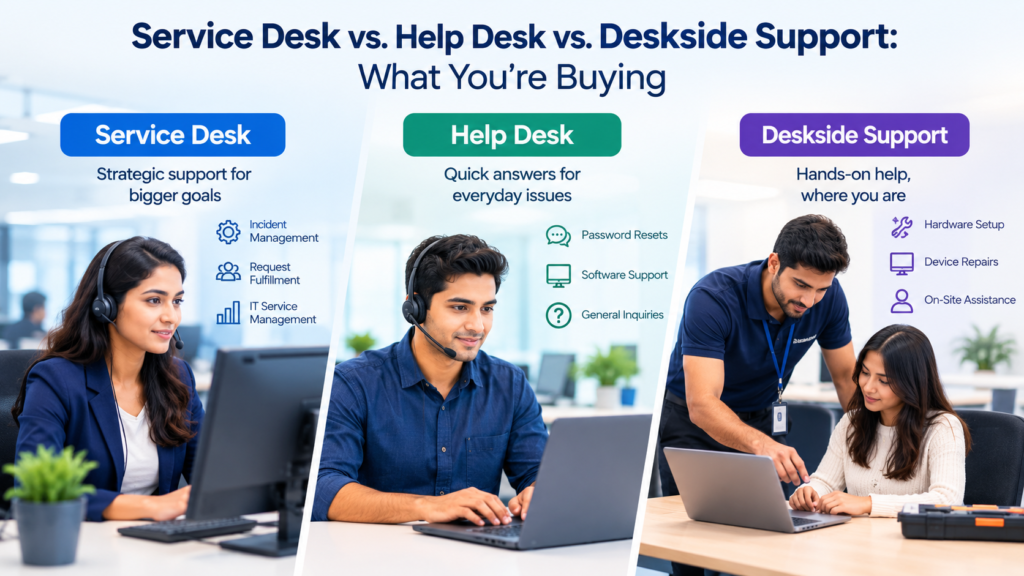
A support contract can look clear on a proposal and still leave major gaps once users start opening tickets. The problem often starts with labels. One provider calls its front line a help desk. Another calls nearly the same team a service desk. A third includes on-site work under desktop support, while another prices that work as a separate deskside service. The name on the line item doesn’t tell you enough about the work behind it.
The useful question is what happens after a user asks for help. Who answers first? Which issues can that team resolve? Who can touch the device? Who owns access requests? Who dispatches an engineer to an office? Which queue owns a recurring problem? What happens after business hours? Those details define the service you are buying far better than the label.
TL;DR
A help desk is usually the narrowest support layer. It receives user issues, handles common fixes, answers routine questions, and escalates work that needs deeper access or skill. An IT service desk normally has a wider service-management role. It may handle incidents and requests while also coordinating service communications, request fulfillment, knowledge, problem records, and service-level reporting. Local support is the physical support layer for work that can’t be finished remotely, such as device replacement, peripheral faults, office moves, hands-on diagnosis, or local equipment tasks.
When comparing service desk vs help desk, don’t buy the name. Buy the scope. The contract should state which users, devices, locations, applications, request types, support hours, channels, and escalation paths are included. It should also state where remote support ends and where deskside support begins. If those boundaries aren’t written down, ticket transfers and surprise charges tend to appear later.
The practical buying rule is simple: match each support layer to the work it can own. Use IT help desk support for defined front-line issues. Use a service desk when the support function must manage a wider set of service requests and service-management duties. Add desktop support services when users have office hardware, local peripherals, device swaps, or other work that requires a person at the site.
Why the labels matter when you buy IT support
The service desk vs help desk difference shows up in scope before it shows up in tools. A provider can run the same ticketing platform for a basic help desk and for a broader service desk. The platform doesn’t decide whether the team owns request fulfillment, major incident communication, recurring-problem review, service-level reporting, or on-site dispatch. The statement of work does.
ITIL gives service desk a defined place in service management. PeopleCert describes the service desk as the central point of contact between a service provider and its users, with communication as a core part of the practice. That wider role is useful when evaluating an ITIL service desk practice because it frames the desk as more than a queue for broken laptops. The exact operating model still depends on the organization, but the service desk label usually signals broader ownership than a basic break-fix function.
The third label, hands-on support, is easier to understand once you focus on location. It covers work that benefits from or requires physical access to the user’s device or site. U.S. occupational data recognizes that computer user support work can happen in person, by phone, or electronically, which supports the practical split between remote support and hands-on work. The O*NET profile for computer user support specialists also lists titles such as desktop support technician and help desk analyst under the same broad occupation, which helps explain why job titles overlap even when service scopes differ.
What a help desk actually includes
In service desk vs help desk terms, a help desk is usually the first support layer for user-reported technical issues. Its core job is to restore the user’s ability to work or route the issue to the right owner. Typical work includes password and sign-in issues, email problems, basic connectivity checks, printer questions, standard application errors, and common endpoint faults that can be diagnosed remotely.
That front-line role lines up with incident management. PeopleCert describes incident management as the practice used to restore normal service operation quickly after a disruption. A buyer can use the ITIL incident management practice as a reference point when checking whether a provider’s help desk has clear rules for classification, priority, escalation, and restoration. The help desk doesn’t need to own every underlying cause to do its job well. It does need to move incidents through the right path without losing context.
The boundary matters just as much as the included work. A help desk may have no rights to make server changes, alter network policy, approve privileged access, or replace hardware. It may be allowed to gather diagnostics but not perform deeper remediation. It may support Microsoft 365 but exclude a finance application that another vendor owns. These are normal limits, but they have to be explicit.
A buyer should also check whether service requests are included. Requests differ from incidents because the user may be asking for something new rather than reporting a failure. Examples include software installation, access to a shared mailbox, a new distribution group, a device accessory, or a standard account change. If the help desk only handles incidents, these requests need another owner. If the help desk does fulfill them, the contract should define the approved request types and approval rules.
What an IT service desk adds
In service desk vs help desk terms, a service desk usually keeps the front-line support role and adds wider service ownership. It remains a place where users report incidents, but it may also manage service requests, communication, knowledge, service-level tracking, and links to problem or change processes. The important difference is the span of responsibility rather than the title printed on the portal.
Service request management is one of the clearest additions. PeopleCert describes the practice as handling predefined, user-initiated requests for services, information, or access. That definition is useful when reviewing whether an ITIL service request process belongs inside the desk contract. If a provider is expected to fulfill standard requests, the service catalog, approval path, target time, and fulfillment owner should all be named.
A service desk may also help coordinate repeated incidents. It doesn’t have to perform root-cause engineering itself, but it should be able to identify patterns and create or route problem records. PeopleCert’s problem management practice focuses on identifying actual or potential causes and managing workarounds or known errors. That creates a useful dividing line: incident work restores service, while problem work aims to reduce repeat failures.
Communication is another difference. During a broad outage, users need consistent updates. A mature IT service desk can act as the communication point while infrastructure or application teams work the technical fault. The desk records impact, groups related contacts, sends approved status updates, and closes the loop after service returns. This prevents users from chasing several technical teams for answers.
What deskside support actually covers
The service desk vs help desk comparison misses a third layer: local support. It handles endpoint or workplace issues that can’t be resolved from a remote session, or that cost less to solve through a local technician. Common examples include replacing a failed laptop, testing a dock, swapping a monitor, fixing a local printer connection, supporting conference-room equipment, moving a workstation, or checking a device that won’t boot far enough for remote access.
The term often overlaps with desktop support services, field support, and on-site end-user support. Industry practice has long treated desktop support as the next destination for tickets that need physical work. HDI’s discussion of first-level resolution distinguishes Level 1 service desk work from Level 2 desktop support and other specialist queues. That distinction matters because an escalation to a deskside technician uses a different resource model from a remote escalation to another centralized engineer.
Desktop support services need clear site rules. The contract should say which offices are covered, whether technicians are permanently assigned or dispatched, what travel radius applies, what the minimum dispatch charge is, whether parking or access costs are passed through, and which spare parts are held locally. A company with 1 headquarters site has a different support need from a company with 40 small branches.
Service desk vs help desk vs deskside support at a glance
The 3 models overlap, but they solve different parts of the support problem. This table gives a buying view rather than a dictionary definition.
| Area | Help Desk | Service Desk | On-Site Support |
| Primary role | Front-line issue intake and common fixes | Central user contact plus wider service support | Physical endpoint and workplace support |
| Typical location | Remote or centralized | Remote or centralized, sometimes distributed | On-site or dispatched to a site |
| Main work | Incidents, questions, basic troubleshooting | Incidents, requests, communication, reporting, service coordination | Hardware swaps, local diagnosis, peripherals, moves, hands-on tasks |
| Remote control | Common | Common | Used when useful, but physical access is the main differentiator |
| Service catalog | May be limited | Often part of scope | Usually receives tasks from the catalog rather than owning it |
| Problem records | Usually escalates | May identify patterns and coordinate records | Supplies technical findings from repeat endpoint faults |
| Asset handling | Basic checks | May coordinate records and requests | Often handles physical handover, swap, collection, or validation |
| Dispatch | Usually no | May coordinate | Core delivery method when no resident technician is assigned |
| Best fit | Defined break-fix demand | Broader managed user support | Sites with equipment that needs physical support |
The service desk vs help desk choice is therefore a question of operating scope. A help desk can be entirely adequate when the need is simple and the internal IT team owns everything beyond first-line support. A service desk makes more sense when the provider must manage a wider request model and provide formal service reporting. Local support becomes necessary when physical work can’t be avoided or when remote-only support creates long delays for device and site issues.
How tickets should move between the support layers
In a service desk vs help desk model, the user should not have to manage the escalation. The user should open the issue once, then the support organization should move the ticket with its history, diagnostics, priority, and ownership intact. Every handoff adds delay, so the first line should gather enough information to prevent the next team from starting over.
A typical flow starts with IT help desk support or the broader service desk. The analyst confirms the user, records the impact, checks known fixes, and uses approved remote tools where appropriate. Microsoft’s current Remote Help documentation shows the type of controls that enterprise remote support can include, such as organizational sign-in, role-based permissions, compliance warnings, and session records. The exact tool can differ, but the operating principle is the same: remote access needs identity and permission controls.
If the issue needs physical work, the ticket moves to hands-on support. The receiving technician should already know the device, location, symptoms, work performed, and any parts likely to be needed. A clean handoff avoids the common experience where a user explains the same issue to several people.
If the issue points to a server, network, security, or business application problem, it may bypass deskside and move to a specialist team. The ticket still needs one visible owner for user communication. A service desk can remain that owner even when another technical group has the work assignment.
A practical escalation sequence
A clear flow often looks like this:
1. The user contacts the support channel and the ticket is logged.
2. The front line verifies identity, impact, urgency, device, and service affected.
3. The analyst checks knowledge and performs approved remote troubleshooting.
4. If physical access is required, the ticket moves to on-site support with diagnostics attached.
5. If specialist access is required, the ticket moves to the correct engineering or application queue.
6. The user receives status updates from the agreed communication owner.
7. Resolution notes and useful fixes return to the knowledge process.
This is where service desk vs help desk becomes operational rather than semantic. A basic help desk may stop after Step 4 or Step 5 and leave later coordination to internal IT. A broader service desk may keep ownership through closure, reporting, and knowledge updates.
What should be in scope and out of scope
The strongest support contracts use a service matrix. It lists the technology and request types that the desk supports, the actions it can perform, the escalation destination, and any approval rule. This prevents “support” from becoming an unlimited promise that nobody can measure.
Start with users and devices. State whether employees, contractors, temporary workers, shared accounts, kiosks, conference rooms, and executive users are covered. Then define endpoints: corporate Windows devices, Macs, mobile devices, virtual desktops, printers, docks, meeting-room systems, and other local equipment. The U.S. Bureau of Labor Statistics describes user support specialists as workers who help users with hardware and software, and notes that some work remotely while other work must happen on-site. The BLS occupational profile for computer support specialists gives a useful neutral reference for the breadth of end-user support work without assuming that every task belongs in one contract.
Next, define applications. IT help desk support might cover identity, email, collaboration tools, VPN access, browsers, and a set of standard productivity applications. Business systems such as ERP, CRM, clinical, engineering, or manufacturing applications may require a separate queue. If the front line only performs triage for those systems, say so.
Request types need the same treatment. Password resets, software installation, shared mailbox access, hardware requests, onboarding tasks, offboarding tasks, and group membership changes can all have different approval rules. A service desk should know which requests it can fulfill directly and which ones require authorization.
For desktop support services, the scope should include physical tasks. List device swaps, loaner devices, peripheral replacement, cable checks, conference-room support, desk moves, hardware collection, shipping, and site visits. Also list exclusions such as personal devices, building cabling, electrical work, specialized industrial devices, or warranty repair that must go back to a manufacturer.
Remote support and on-site coverage are different purchases
Remote support buys access to a centralized talent pool. On-site support buys local presence. They can work together, but their staffing math is different. Remote agents can usually support users across many locations. A deskside technician can only be in one place at a time and loses capacity to travel, security check-in, equipment handling, and site logistics.
Modern remote tools can resolve a large share of endpoint issues without a visit. Microsoft recommends planning role permissions, supported platforms, network requirements, and the level of control granted to each support role before deployment. Those considerations appear in Microsoft’s Remote Help planning guidance, and they illustrate why remote support is both a technical capability and an access-control decision. A buyer should ask which remote tool is used, what logs are kept, and whether the provider can take unattended control.
Local support still matters when the device is offline, damaged, physically inaccessible to remote tools, or tied to local equipment. It also matters for work where shipping delays would create more downtime than a site visit. Desktop support services can be structured in several ways: a full-time resident technician, scheduled site days, a shared local technician, or dispatch when a ticket meets defined criteria.
SLAs and metrics should match the support layer
A service desk vs help desk comparison needs more than 1 SLA to describe the support system. Response time matters at the front line, but a deskside ticket also needs a dispatch or arrival target. A service request may need a fulfillment target. A major incident may need a communication interval. Buyers should select measures that match the work each team controls.
Service-level management is intended to set business-based service targets and monitor whether agreed levels are being met. PeopleCert’s service level management practice is a useful reference when deciding how targets should be defined and reviewed. The key procurement point is that a target needs a clock, an owner, a start event, a stop event, and exclusions.
For IT help desk support, useful measures include time to first response, first-contact resolution, abandonment for phone channels, reopen rate, backlog age, and user feedback. First-contact resolution needs a strict definition because the number can be made to look better by closing tickets too early or by excluding hard categories.
For an IT service desk, add request fulfillment performance, communication quality, problem referrals, SLA attainment, aging by service, and knowledge use. Trend reporting should separate incidents from service requests because the work has different causes and target times.
For hands-on support, measure dispatch acceptance, arrival time where relevant, resolution time, repeat visits, parts delay, and tickets returned to Level 1 as misrouted. HDI has written about desktop incident mean time to resolve, noting that on-site desktop incidents often include device, printer, connectivity, or other faults that couldn’t be finished by the remote first line. That distinction is useful when a buyer sets targets for physical work.
Metrics should expose handoff problems rather than hide them. If the help desk hits its response SLA by transferring nearly every ticket, the user may still receive poor support. Pair speed measures with resolution and transfer measures so the contract rewards useful outcomes.
Security controls belong in the support contract
Support teams sit close to identity, endpoints, and privileged workflows. That makes security part of the service definition. A provider may need to reset credentials, start remote sessions, install software, collect device data, or route suspicious activity. Each action needs approved controls.
Identity verification is especially important for password resets and account recovery. NIST’s current Digital Identity Guidelines cover identity proofing, authentication, authenticator management, and related processes. A commercial support desk isn’t automatically bound by federal guidance, but the principles give buyers a strong reference when they review identity checks for sensitive support actions.
Remote access should use named accounts, role-based permissions, and auditable sessions where the tool supports them. Shared administrator credentials make it harder to tell who performed an action. The desk should also have a defined process for requesting temporary privilege and for returning control when the work is finished.
Security incidents need a different escalation path from ordinary support tickets. A user who reports a phishing message, suspected account takeover, malware warning, lost device, or unusual sign-in shouldn’t wait in a general queue if the issue meets security criteria. NIST’s 2025 revision of its incident response guidance explains that incident response should be integrated into cybersecurity risk management, which supports a contract design where the desk knows when to invoke the security process rather than treating every event as a routine ticket.
On-site support adds physical controls. Technicians may handle replacement devices, collect retired equipment, enter restricted offices, or work with devices that contain sensitive data. The contract should state chain-of-custody expectations, local access rules, and what happens to failed drives or devices.
What drives cost in each support model
Service desk vs help desk pricing follows workload and coverage. The service label alone doesn’t set the price. A low-volume 8×5 help desk for standard applications has a different cost base from a 24×7 service desk that owns request fulfillment, reporting, major incident communication, and several business applications. A deskside model adds geographic cost because staff or dispatch partners need to reach physical sites.
Labor remains a major cost input. The latest U.S. Bureau of Labor Statistics data reports a 2025 median annual wage of $61,860 for computer user support specialists. The same source also notes that support may require nights or weekends. The BLS occupational requirements profile adds detail on work conditions and telework availability, which helps explain why after-hours and local presence change staffing economics.
For IT help desk support, common cost drivers include supported user count, ticket volume, channel mix, support hours, language needs, application count, and expected first-line resolution. Dedicated teams cost differently from shared teams because reserved capacity can’t be used elsewhere.
For an IT service desk, add service-management duties. A service catalog, regular service reviews, request workflows, knowledge ownership, major incident communication, and deeper reporting require staff time beyond answering contacts. If the provider must work inside the buyer’s ITSM platform, onboarding and integration work can also affect the setup cost.
Desktop support services add site count, user density, travel time, resident coverage, dispatch targets, spare-parts handling, shipping, and local access constraints. A national footprint may require a field network rather than a single local team. Remote offices may have higher per-ticket physical support costs even if they produce fewer tickets.
The cleanest quote separates recurring support from variable work. Recurring fees can cover the defined desk service and scheduled site presence. Dispatch outside the included model, project work, large refresh events, and unusual after-hours site visits can have separate rates. This makes the base service easier to compare between providers.
How to choose the right mix
For a service desk vs help desk choice, start with the work your internal IT team wants to keep. If internal engineers own applications, infrastructure, security, request approvals, and major incidents, a focused help desk may be enough. The external team handles user contact and common fixes, then escalates cleanly to internal owners. In that case, paying for a broader service-management layer may add cost without solving a real gap.
Choose a service desk when you want the provider to own more of the operating process. That may include request fulfillment, user communication, service reporting, knowledge upkeep, recurring-issue review, and coordination across several technical queues. In the service desk vs help desk decision, this wider ownership is usually the most important dividing line.
Add local support when physical work is frequent enough to affect user downtime. The trigger can be obvious, such as offices with many laptops, printers, docks, and meeting rooms. It can also appear in ticket data. If remote analysts repeatedly escalate the same classes of hardware and local connectivity issues, desktop support services may remove delay and reduce shipping or ad hoc contractor costs.
A buyer checklist before signing
Use the contract to answer these questions:
· Which users, devices, locations, and applications are covered?
· Which incidents can the first line resolve without approval?
· Which service requests can the desk fulfill?
· Who owns ticket communication after escalation?
· What requires deskside support rather than remote work?
· Which sites have resident support, scheduled visits, or dispatch?
· What are the support hours for remote and on-site work?
· How are priority and business impact defined?
· Which SLA clock applies to response, dispatch, and resolution?
· What identity checks are required before sensitive actions?
· Which remote support tools and privilege controls are used?
· Which metrics appear in the monthly service report?
· How are recurring incidents moved into problem review?
· Which tasks are excluded, and where do those tickets go?
· Which charges sit outside the recurring fee?
A useful final test is to walk 5 real tickets through the proposed model. Use one password issue, one laptop failure, one software request, one business application incident, and one after-hours outage. Ask the provider to show who owns each step and when the user receives an update. That exercise exposes vague boundaries quickly.
Common buying mistakes to avoid
The first mistake is buying a label. A provider can call a small reactive queue a service desk, while another provider may call a wider function a help desk. Compare the statement of work, staffing, permissions, and processes. The service desk vs help desk phrase is useful for framing the decision, but the contract language is what you will actually receive.
Another mistake is measuring activity instead of service. High ticket closure counts don’t prove that users received useful support. A desk can close many simple tickets while difficult incidents age elsewhere. Review transfer rates, reopen rates, backlog age, request completion, and deskside repeat visits alongside speed measures.
Conclusion
The support model should follow the work. A help desk is usually the front line for common incidents and user questions. An IT service desk adds broader service ownership, request handling, communication, reporting, and links into other service-management practices. On-site support covers the physical tasks that remote teams can’t finish.
That makes the service desk vs help desk decision less about terminology and more about responsibility. Buyers should define what the provider owns from first contact through closure, where escalations go, and which functions remain with internal IT. The same discipline applies to local support: state when a physical visit is triggered, where coverage exists, and what response target applies.
A clear contract describes users, technology, locations, work types, hours, access, metrics, and exclusions. Once those items are written down, competing proposals become easier to compare because each provider is pricing the same work rather than a different meaning of “support.”
FAQs
What is the main difference between a service desk and a help desk?
A help desk usually focuses on front-line issue resolution and basic user support. An IT service desk generally covers a wider set of responsibilities, which can include incidents, service requests, communication, reporting, knowledge, and coordination with other IT service-management processes. The terms are sometimes used interchangeably, so buyers should compare the actual statement of work instead of relying on the name.
Is a help desk always Level 1 support?
A help desk is often Level 1, but the term doesn’t force a specific tier model. Some help desks include Level 2 technicians or application specialists. Others perform only intake and basic troubleshooting. The contract should state what the first line can resolve, which tools and permissions it has, and which teams receive escalated tickets.
What is deskside support?
On-site support is hands-on support delivered at the user’s location or another physical site. It commonly covers device swaps, local hardware faults, peripherals, conference-room equipment, workstation moves, and issues that can’t be completed through remote access. It may be delivered by resident technicians, scheduled site visits, or dispatch.
Is on-site support the same as desktop support services?
The terms often overlap. Desktop Support can include both remote endpoint work and physical support, while deskside support usually emphasizes work performed at or near the user’s desk. Buyers should check the scope because one provider may include remote desktop support but charge separately for site visits.
Can one provider deliver all 3 support functions?
Yes. One provider can operate the service desk, provide IT help desk support, and deliver local deskside work. The main requirement is clear ownership between tiers. Tickets should move with their history and diagnostics, and the user shouldn’t have to find the next team after an escalation.
When does a business need an IT service desk instead of a help desk?
A service desk is useful when the provider must handle more than routine break-fix support. Common reasons include formal service requests, service-level reporting, wider user communication, knowledge ownership, problem referrals, and coordination across several technical teams. A smaller environment with strong internal IT ownership may only need a focused help desk.
What issues should stay with IT help desk support?
Routine incidents that can be resolved with approved tools and documented procedures should usually stay at the first line. Examples include common sign-in issues, standard email problems, basic software faults, simple connectivity checks, and known workarounds. The exact list depends on permissions, applications, and the buyer’s risk rules.
What issues should go to on-site support?
Tickets should move to on-site support when physical access is required or when a local visit is the practical way to restore service. Examples include failed devices, broken peripherals, docking problems, local printer faults, hardware replacement, equipment moves, and devices that can’t be reached with remote tools.
Does a 24×7 service desk include 24×7 on-site support?
No. Remote desk hours and deskside coverage are separate requirements unless the contract says otherwise. A provider may answer tickets 24×7 but only dispatch local technicians during business hours. If overnight or weekend physical response matters, the required sites and response targets should be priced and written into the agreement.
What SLA should a help desk have?
There isn’t one universal SLA. Targets should reflect business impact, support hours, ticket priority, and the work the help desk controls. Common measures include first response, resolution, backlog age, first-contact resolution, and user feedback. The contract should define how each clock starts, pauses, and stops.
How should deskside support be measured?
Useful measures include dispatch acceptance, arrival time, resolution time, repeat visits, parts delays, and tickets that were sent to deskside even though Level 1 could have resolved them. These measures show whether physical support is being used for the right work and whether the local model is meeting site needs.
What makes service desk pricing go up?
Cost usually rises with longer coverage hours, higher ticket volume, more supported applications, language requirements, tighter response targets, dedicated staffing, deeper request ownership, and stronger reporting needs. Extra site work also changes cost. Buyers should separate recurring desk services from project work and unusual demand spikes.
What makes on-site support expensive?
Physical coverage becomes more expensive as site count, travel time, response requirements, and local staffing needs increase. A resident technician has a different cost base from scheduled visits or dispatch. Spare equipment, shipping, secure site access, after-hours visits, and hardware handling can also affect the price.
Should the service desk own major incident communication?
It often makes sense for the service desk to act as the user communication point while specialist teams restore the affected service. That arrangement gives users one source for approved updates. The contract should state who declares the major incident, who sends updates, how often messages are issued, and who confirms recovery.
How do I compare 2 support proposals fairly?
Give both providers the same service matrix. Include users, locations, devices, applications, request types, support hours, priority rules, remote access expectations, deskside coverage, reporting, and exclusions. Then walk several real ticket examples through each model. This exposes differences in ownership and hidden charges that a high-level price comparison can miss.